> For the complete documentation index, see [llms.txt](https://wiki.cobblemon-ultra.fr/wiki/llms.txt). Markdown versions of documentation pages are available by appending `.md` to page URLs; this page is available as [Markdown](https://wiki.cobblemon-ultra.fr/wiki/informations/probleme-launcher.md).
# Problème Launcher ?
Un problème pour rejoindre le serveur sur le serveur ? Quelques solutions ici..
## Le launcher reste à 100% après avoir cliquer sur Jouer
{% hint style="info" %}
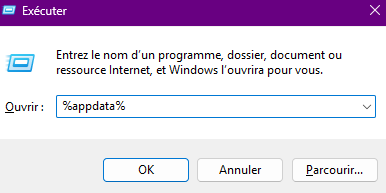
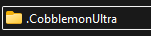
Solution : Supprimer le .cobblemonultra depuis votre %appdata% et relancer le launcher.
{% endhint %}
## Le problème de lancement persiste après suppression
{% hint style="info" %}
Solution : Désinstaller tous les Java depuis vos Programmes ainsi que le launcher et réinstaller le Launcher qui installera automatiquement Java 21.
{% endhint %}
{% hint style="warning" %}
Vous pouvez également utiliser :
Pour retirer les versions obsolètes de Java !
{% endhint %}
## Problème Launcher en étant sur Mac ?
{% hint style="info" %}
Solution : Ouvrez le launcher puis allez dans paramètres suivi de mods
Cliquez sur Ajoutez un mod (F5 pour actualisé)
Et supprimer les dossiers :
* mcef-cache
* mcef-libraries
Une fois supprimés, relancez le launcher.
{% endhint %}
## Autre solution en étant sur Mac
{% hint style="info" %}
Solution : Installez **Freetype** via Homebrew (brew install freetype) afin que libfreetype.dylib existe dans : **/usc/local/lib/**\
\
Faites pointer Java explicitement vers OpenJDK 21 via Homebrew\
Ajoutez l'argument **JVM -Dorg.lwjgl.freetype.libname=/usr/local/lib/libfreetype.dylib** pour indiquer ou le trouver dans la bibliothèque.
{% endhint %}